Here are steps to increase or decrease the priority of any process on Windows XP/2000 machine!
- Press CTRL+SHIFT+ESC or CTRL+ALT+DEL
- Go to the second tab called Processes, right click on one of the active processes, you will see the Set Priority option. (as shown in following screenshot.)
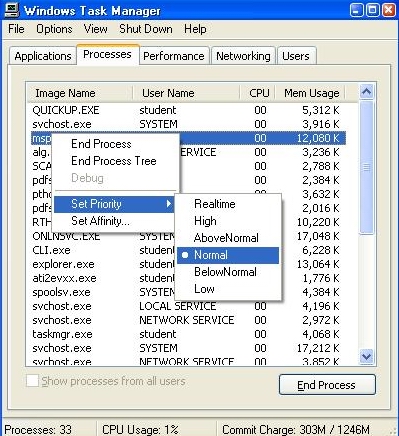
- Default is normal, change it to…
- AboveNormal, High, Realtime to increase process priority OR
- BelowNormal, Low to decrease process priority!
FAQ:
Q. Why I need this?
Ans: When multiple programs are running, there may be few dear programs. Like some anti-virus scanning is running along with some movie, you will get smooth decoding of movie by increasing its process priority and/or decreasing process priority of antivirus.
Note: If only a single program is running then it may not get benefit from changing priority!
You must be logged in to post a comment.