If you are Windows user then you might have seen something like below in past:

There are other similar error alerts like…
- Cannot delete file: Access is denied
- The source or destination file may be in use.
- The file is in use by another program or user.
- Make sure the disk is not full or write-protected and that the file is not currently in use.
- etc…
Most of the times files/folders are locked by some applications you may not know. So even closing application in doubt doesn’t solves problem.
I often get this error so was wondering if there any way to unlock the file/folder I want to move/delete. Thanks to Google, I found this nice application named Unlocker…
#How-To Use
- Click here to download Unlocker (size: 190KB). Setup is simple and quick. After installing…
-
Just right click on file/folder and select Unlocker from context menu as shown in following screenshot…

- A window with list of applications having lock on file/folder will appear
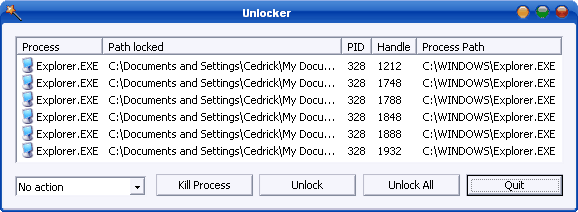
- Select Unlock All or any other option. Its your choice!
More info, FAQ and a comparison chart with other similar softwares is on official Unlocker webpage!
Hope you will find this useful at some point in time… 🙂
Unlocker Links: Download | Homepage
[Credit Note: All screenshots in this post are via Unlocker Website]
4 Comments
thanks 🙂
@sauravjit
Your welcome bro… 🙂