One of our reader Deepak Jain wants to add Adsense banner ads in his blogspot blog.
While its simple to add any HTML/Javascript code in blogspot blogs using HTML/Javascript new element, option to add such element is by default disabled in header menu.
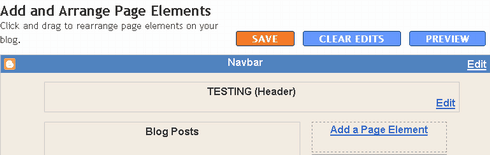
The problem can be easily seen in following two screenshots which are taken from Layout >> Page Element panel…
A. Default Options..
B. After Enabling "Add a Page Element" Option…
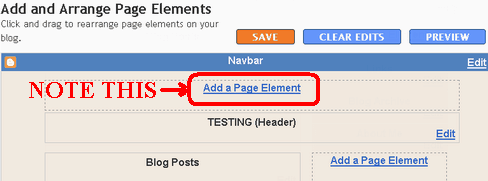
Once Add a Page Element option comes there, you can edit blogs header as simply as editing sidebar. Putting Google Adsense ads in header won’t be any different than doing same in sidebar!
# Steps to Enable Add a Page Element Option…
1. Go to Layout >> Edit HTML Option
2. Search following codes in Edit Template box…
    <div id='header-wrapper'>
      <b:section class='header' id='header' maxwidgets='1' showaddelement='no'>
3. Make following two changes
-
Change maxwidgets=’1′ to maxwidgets=’2′ or any number greater than 1.
-
Change showaddelement=’no’ to showaddelement=’yes’.
4. Click on Save Template!
That it! Just go back to Page Elements tab and you will see Add a Page Element Option there! 🙂
7 Comments
Hey thanks for your info. But I want to know how these ads can be put in side of header.ie with in the header itself. I want to put adsense ad on my blog for central govt employees news .
The ads should appear on the right side of header not on above the header. plz tell me the solution.
Thanks for your help !! But how can i add widget inside the blog header? not above or below the header ?? Thanks !!
tips are useful but it is in the design sense if you can provide the information. How to apply the ad sense so it become more beneficial for the users.
I have posted many articles from free article web site to our blog( i mean direct copy article with title and post to our blog?) i do same,but google delete my blog under spam. I used credits for the site source also.
thanks for the information……!!!
Very useful info. Thanks for the trick man!