Form last few days Orkuts theme feature is creating buzz. I am receiving lots of mails/comments with same questions again and again. This post is an attempt to answer some common FAQ…
Q. Are Orkut Themes officially available for all users?
One word answer is NO. They are limited to few Indian users only as mentioned in this official orkut blog post. But don’t get disappointed, as you can still enjoy this theme feature by using a greasemonkey script as explained here.
Q. How to know if you can use orkuts theme feature officially?
All of below indicate theme feature is available to you…
- When you log into your account you will see ‘change theme’ link beside logout option in top-right corner.
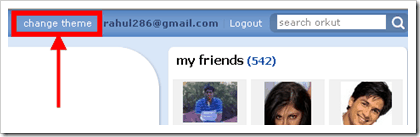
- When you can see themes on your friend profiles. Just check ‘get this theme’ option which will appear then near logout option in top-right corner.
- Go to Edit Profile option. A new tab, themes will be there!
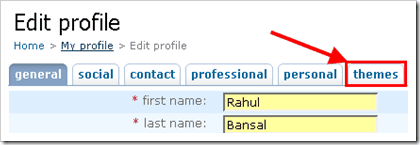


Q. Can these themes be seen my friend on orkut?
If the person visiting your orkut profile also have this theme feature enabled on their account, they will see your profile in your selected theme unless they choose to disable the feature manually as explained below.
This is better than old greasemonkey script & userstyle themes.
Q. I hate themes, I want old, clean & simple orkut back…
YES, you can do that. In fact I have disabled themes on my account.
To disable theme feature completely on your account, go to Edit Skins option and check Disable themes option. You will now get old Orkut interface throughout the site.

If you just want to keep your theme to old orkut but like to see how colorful your friends are then just select the orkut blue theme.
If you still have any other question regarding orkut themes please post it here via comments. I will try to answer it. 🙂
Related: Enjoy orkut themes before they enable on your account
18 Comments
in orkut the themes which has recomended only that can be used but u should do such that whichever picture or theme one want can upload…………
@bismaydash
You can use greasemonkey script for more orkut themes but the problem is that your theme cannot be seen by others…
Hi,
Thanks for the update. I’ve provided a detailed tutorial on How to change orkut themes without Firefox, Greasemonkey, or downloading at http://technology.ravisblognet.com/2008/06/how-to-change-orkut-themes-without.html
I’ve also linked to your blog for Orkut FAQs.
@Ravi
Thanks Ravi… 🙂
it really worked..u r doing a splended job…can this theme will visible to others??
@Shah
If you are using greasemonkey script then your themes will not be visible to your friends at other end
Hi..
I disabled the theme option bcoz of low bandwidth..
But now i m not able to reactivate it again..
that checkbox option is permanently disable for me..
tell me wat to do?
@Raj
Sorry for late reply bro…
I guess there may be some prob at your end.
Try form another machine with high speed connection…
And also check if you are not using low bandwidth version.
Details about it are here. 🙂
i am unable to get the themes. early the themes were slow so i shifted to fast theme but here i am not getting the pictures at all. plz look into the matter as early as possible.
@avinash
You may be using low bandwidth mode.
Try switching back to normal mode.
hie, actually i am unable to see the link of ‘Change Theme’ anywhere, neither in the top bar nor in my Edit profile page.
and even i do not want to use Greasemonkey or something like that.
please help em out.
Regards,
@Zain
Use link – http://www.orkut.com/EditSkin.aspx
@Jimmy
Greasemonkey themes cannot be made visible to your friends
@Ashvin
You may need Greasemonkey to install third party themes.
is any way so that created theme by greasemonkey script will be visible to friends at other end
I DOWNLODE SOME orkut themes form “technobuzz.net” and i want to know how can i applay those themes for my orkut account.
if u can,please help me.
Hi i clicked on this link http://www.orkut.com/EditSkin.aspx and this give me an error invalid page.
Thanks Rahul…i spent hrs searching for the option and you solved my query in a minute!
i post orkut themes in my profil but now my friend pfofile is also changed what i selected that is applied to my friend profile also , i wnt themes for my profile only plz help me