Just noticed a new Orkut Setting so that you can choose who can scrap to you! You can choose between…
-
Friends Only
-
Friends of Friends (recommended by DW)
-
Everyone in your networks
If you haven’t noticed it yet, look for a handy link in your scrapbook as shown in following screenshot…
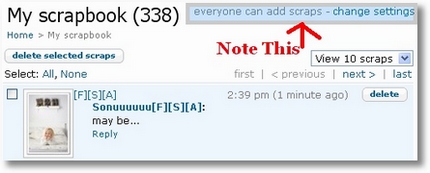
Clicking on it will take you to the Privacy Setting page of your Orkut account. Under setting “select who is allowed to view my content“, modify write in scrapbook option from drop-down menu. Setting it to all of my friends will prevent rest of the people on orkut from scrapping you.

I guess people (specially girls) concern about their privacy should choose either Friends or Friends of friends!
This will surely bring some relief to girls who are annoyed by sick people on Orkut! Isn’t it???
27 Comments
I don’t see the option allow scrapps to be written by – in my orkut account settings option. Any idea ?
Regards,
Palaniappan
@Palaniappan
Hey check this post again. Changed some screenshots…
Actually orkut made some changes over the time so I need to edit this post.
hi, andar here, i just read your post. i like very much. agree to you, sir.
@andar
Thanks andar… 🙂
I have seen some people making their scrapbook invisible to their friends too. You can only view the scraps written by you in their scrap book.How can we do that
I guess there is some misunderstanding or user is cleaning his scrapbook all the time.
As far as I know, Orkut doesn’t offer such an option.
rahul, its true. i hav sen many people making their scrapbook invisible to other frnds. u can view the scraps written by u only. i wonder how they r doing it? nyways something is there.. can u find it?
Hi,
I have a big query on orkut scrap book.I have 2 girl friends & both are added into my account as friends.I don’t want to read all my scraps & restrict them to see only those scraps,which they have written to me.Is it possible? if so tell me the settings.
Thanks
I too facing the same problem but i cannot find the solution yet.
The solution is too urgent otherwise …………………\
With regards and thanks
Anil
@Slvadutt & Anil
I guess better option is to use keep your scrapbook clean using scrapbook deleter script.
If someone ask about it, you can say you are concerned about privacy of all your friend! 😉
restricting scraps from friends on December 24, 2008
I have seen some people making their scrapbook invisible to their friends too. You can only view the scraps written by you in their scrap book.How can we do that
I have seen some people making their scrapbook invisible to their friends too. You can only view the scraps written by you in their scrap book.How can we do tha
my scraps donot come on side of my profile
i cant neither chat directly from der can u please tell why is it so
and the solution
hi, i want to restrict the strange users viewing my orkut photo albums. What to do? help..
@Kathukal
Keep them private! 😀
hello, i am not able to send scraps to one of my friend in orkut but he is in my friends list , when i want to post the scrap it shows that “You cannot creat this scrap” please help me what i should do ..
@samir
Cross check that he’s still in your friend list. There might be two reasons cuz of which you are not able to send scraps,
1.You have send lots of scraps before, so this service will be unavailable for you for the next 24 hours
2.You are in your friend’s ignore list.
I have seen some people making their scrapbook invisible to their friends too. You can only view the scraps written by you in their scrap book.How can we do tha
dear ,
in my orkut profile , i filled the required options but some of its not filled , the problem is after the changes made it shows some of the unfiled or empty options in my orofile
i cannot find reply option in the scrapbooks ,, in the new version of orkut ,,, plz help me …
hey
not about what u mentioned here.. I want to send scrap, for example, to a friend. i just want it to be seen by my friend only and not anyone else… is it possible??
Hi,
please help… we are receiving mail while someone scrap us.. what is the software or program behind that…
i’m unable to set my orkut privacy settings.some thing is wrong.please send reply.i wana change my privacy one.
Hi when i send a scrap from my id to other id. When i write a scrp and click on send option i just see his scrapbook, not my scrap . What i do .help me