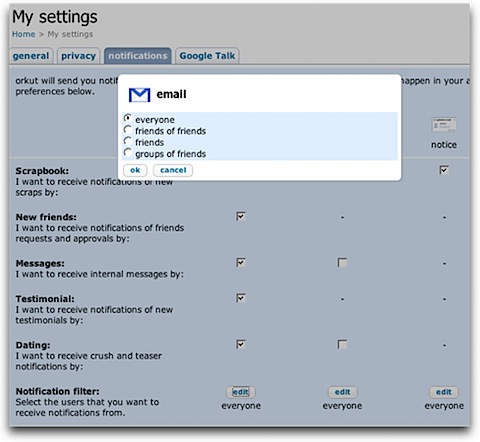
In a smart move from orkut team, to reduce spam notifications you get in your mailbox, a new setting – Notification Filter is added to orkut’s existing settings.
With this setting you can choose to receive notifications from either:
- everyone
- friends of friends
- friends
- groups of friends
You can also configure filters individually for email notification, orkut message-box notification and orkut pop-up notification.
Although not strong as Gmail filters, these orkut filters can provides fine-grain control over existing orkut settings.
Still one major improvement many orkut users awaiting from long time is list of online friends. It will be great if small pop-up notification window on orkut blinks whenever a friend comes online. As of now such notifications are shown only when somebody scraps you on orkut.
5 Comments
i want my orkut version back to old version
@pardis –
Cant help with that… sorry! 🙁
Hi
I have problem whith theams in my orkut how to change my older verstion theam in account
@prasad
I guess u want to switch back to original theme…
Just go to theme settings and select disable theme options. 🙂
sry guys m not understand tell pllz explain in breif