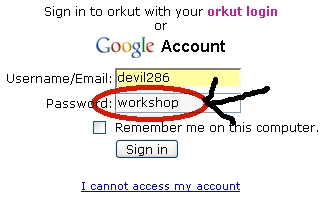
If you ever come across a page like below, then this is for you!

U might have heard about Sandboy’s Revelation who unmask password fields like this!
But Revelation works with only windows based application and fails with Firefox! Once again thanks to open-source for Firefox!
Now lets do it in Geekish way so it will work with all kinda browsers and of course independent of platform!
Here comes javascript which is tested on Firefox & IE!
javascript: alert(document.getElementById('Passwd').value);
Just copy above code and paste it in ur browsers address bar (navigation bar or url bar).

They press enter and you will see a prompt like this!

Of course your password may be different!
There is one more similar script! This will change HTMLs <input> tags “type” attribute from “password” to “text”!
javascript: alert(document.getElementById('Passwd').type='text');
On hitting enter you will see a prompt, just ignore it and look at screen… The password field will be unmasked any now and look like this…
The above script may fail on hotmail when opened in firefox! But don’t worry, as you are in Devil’s Workshop!
Try following code in the same way! This does not work with antique IE 6.0 and with release of firefox 2.0, I did not bothered to give IE 7.0 a try!
This will again prompt password like above!
javascript: function getElementsByAttribute(oElm, strTagName, strAttributeName, strAttributeValue){ var arrElements = (strTagName == "*" && oElm.all)? oElm.all : oElm.getElementsByTagName(strTagName); var arrReturnElements = new Array(); var oAttributeValue = (typeof strAttributeValue != "undefined")? new RegExp("(^|s)" + strAttributeValue + "(s|$)") : null; var oCurrent; var oAttribute; for(var i=0; i< ocurrent =" arrElements[i];" oattribute =" oCurrent.getAttribute" oattribute ="="> 0){ if(typeof strAttributeValue == "undefined" || (oAttributeValue && oAttributeValue.test(oAttribute))){ arrReturnElements.push(oCurrent);}}} return arrReturnElements; } alert( getElementsByAttribute(document.body, "input", "type", "password")[0].value);
And this will unmask password filed like above!
javascript: function getElementsByAttribute(oElm, strTagName, strAttributeName, strAttributeValue){ var arrElements = (strTagName == "*" && oElm.all)? oElm.all : oElm.getElementsByTagName(strTagName); var arrReturnElements = new Array(); var oAttributeValue = (typeof strAttributeValue != "undefined")? new RegExp("(^|s)" + strAttributeValue + "(s|$)") : null; var oCurrent; var oAttribute; for(var i=0; i< ocurrent =" arrElements[i];" oattribute =" oCurrent.getAttribute" oattribute ="="> 0){ if(typeof strAttributeValue == "undefined" || (oAttributeValue && oAttributeValue.test(oAttribute))){ arrReturnElements.push(oCurrent);}}} return arrReturnElements; } ; alert( getElementsByAttribute(document.body, "input", "type", "password")[0].type="text" ) ;
Above scripts successfully tested on gmail, yahoo, hotmail, rediff login pages! Orkuts login pages have frames so the above may fail! In fireox you can also right-click on any frame and can open that frame separately in different window or tab and then can use any of above script!
Also any password field can be unmasked using DOM Inspector in firefox! Please don’t make false assumption that firefox is insecure! There is a feature called “master password” in firefox! That will protect your passwords against all javascript, DOM Inspectors, etc!
Who needs revelation (at least for web pages) … Enjoi!!!
Related Link:
Inspect Element with DOM Inspector
(Please note that the DOM Inspector must be installed. (Select “Developer Tools” during custom setup of Firefox)
Click here to download Firefox!
Credits: Thanx to Robert Nyman for getElementsByAttribute! I wish a function like this should be included in standard!
12 Comments
demo in video is requested.is it works on yahoo chat??
@John
It works on any webpage from your browser. 🙂
I will try creating video but have really no time. 🙁
well i suppose it does not work with facebook.I tried in vain!
Really useful resource!
Thanks for sharing.
Hey, I have tried many times. But this script does not works with Windows 7 OS.. But When I tried in Win XP, it works… Is OS plays a role here?
no i thinks so because i use win 7.
OS never plays a role in this.
I tried doing it on my chrome browser but it the page is being directed to yahoo search 🙁 A window doesn’t pop up showing the password.
This trick is not working now.
popup window is not opened……the google search of the given script is opened
Now it is no longer used