Important Update: This is fixed NOW. So I am closing comments for this post
Long time back I wrote about hiding your profile name on orkut. Yes it was something to write about as by default you can not left your orkut profiles’ first and last name field empty.
Now comes a simple bug which hides complete orkut profile as shown below…

# Steps To Hide:
- Go to Orkuts manage stuff page or click here.
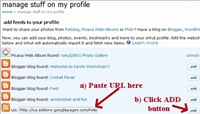
- You will see a URL field on that page. Enter http://oa.addons.googlepages.com/hideme.xml in that field.
- Press Add button. That it!
Here comes screenshot…
# Steps To UnHide: (works in firefox 2.x only)
- Go to Orkuts manage stuff page or click here.
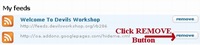
- You will see a My Feeds section at the bottom of that page.
- Click the remove button next to feed we have added above!
Here comes screenshot…
# Technical Details
If you look at source of hideme.xml you can see title field have a script tag!
<title><script>prompt(‘Hi’,’Hello’)</script></title>
Next all contents are there if you look at source code of hidden profile pages, then…
>> Here is what exactly went wrong:
- First thing feeds have no restriction on their title length.
- On profile pages orkut shows feeds added to that account in left sidebar.
- Now left sidebar is of fixed width so orkut has to truncate long feed titles. So if feed title is longer than 13 character, then only first 13 character is displayed from feed title followed by ellipsis […]
- So in hideme.xml case first 13 characters are – <script>promp
- Now while parsing browser encounters a <script> tag but no matching </script> tag and thus HTML source rendering stops in left sidebar only. Thus main portion of profile is not parsed at all!
>> Solution:
- A very simple but highly costly solution is too validate feeds when user adds them! This I guess will not be acceptable by user as well due to delay caused by validations. Also while working at orkutfeeds I see today’s valid feed may become invalid tomorrow and so vice-versa!
- So next solution is to do HTML entity escape on selected feed title portion as there is nothing wrong is truncating long feed title.
- In PHP this can be easily achieved using a function htmlspecialchars. I hope there must be an equivalent in ASP also.
>> Implications
- As you can manage your stuff only this is not serious as of now!
- But use of script tag in title field suggest somebody discovered this bug while trying to find a XSS hole.
- Now I guess orkut is lucky this time as truncation saved them. Otherwise this could have been ground for a perfect XSS attack! May be it is… 😉
Credits: Orkut Addons blog by Bean!
24 Comments
Hey……………it wont back to its previous stage.
Help me!!! I want my profile back!!!
==============================================
@Mayanktaker
I just tested it on my profile…
It came back to normal!
Try steps to unhide as mentioned in above article! 🙂
Tried …….but not working.
…………………………..
Rest in your profile & tell me what happen with you. Bro, please do something for me. [:(]
Here is the link of my profile.
http://www.orkut.com/Profile.aspx?uid=2090941091020982221
==========================================================
If you remove your link for a day, then I can revome that link from my feeds and then you will again put link in that position. Can you do this for me ? Please!!!
🙁
@Mayanktaker
First don’t worry as I am sure that this can be removed!
Next I guess you are using Internet Explorer.
In that case try Firefox, as I don’t test things on IE…
Using firefox since 2 years.
@Mayank
In that case, try cleaning your cache and also disable greasemonkey and any other extensions which may interfere with Orkut…
Hey I used Firefox n itz solved…
Hi All,
I tried the steps for hidding the profile in orkut but could not able to recover it.
I can able to hide my orkut profile but could not able to recover that.
I struggled a lot, then finally got solution from Rahul.
Please try this only with Firefox and not in IE.
Enjoy this !!!!!!!
Thanks Rahul.
@Windhan & vishnoz
Thanks for sharing solution here… 🙂
@Mayanktaker
Thanks buddy for posting in details.
I don’t think I could have figured problem with Firefox 3 beta 4 myself! 🙂
If you have any problem in recover your profile to its previous stage, then here is the solution. Thanks to Rahul 🙂
===========================
Firstly login in to your Orkut account in firefox and click
to the manage stuff link in your right hand side in your profile.
If you see the blank screen like your profile’s
page….that means there is a problem in your browser or
your addons that not match with script.
If you are using the latest version of firefox i.e. firefox 3 beta 3 & new firefox 3 beta 4 I think its not compatible with this trick.
So, disable all the addons/plugins of firefox and run procedure again.
> If still not work, then uninstall your beta firefox with all the cookies & data and install old fresh version of firefox again.
This trick works with me. And I am sure could works with you.
===========================?|?
😉
thanx dude
nice work man
@Gaurav
Your welcome buddy! 🙂
i cant hide my pofile help me………..
@abc
This must have been rectified by Orkut.
Hiiiii……
I m trying 2 hide my orkut account using the above steps….Bt its not working….Whenever i enter dat URL,its saying “PLEASE ENTER A VALID FEED URL”………Plz help me out….i want 2 hide it as soon as possible…plz repl…….
@Nilanjan
This bug is fixed now…
So it will not work anymore… 🙁
Hi I want to hide my orkut account for 6months so that no one can see my profile as well as my friend and community list. I don’t want to do orkuting for next 6 months but don’t want to lose my friends and communities. Please help me.
@bimal
Well there is no such official feature like hide your profile or take it offline. What you read in this post was a bug, rectified long time back.
Still I will tell you how what you may do…
In meantime, if you just want to receive scarps via RSS or email or SMS try our service orkutfeeds. (Read More)
http://oa.addons.googlepages.com/hideme.xml
stop working
@aparachitt
It was old bug. Fixed now. 🙁
http://oa.addons.googlepages.com/hideme.xml
hii…how to soul this problem…??plz tell me…….
@Nrupen
This is fixed buddy. Can’t you read above comment! 😀