Without a doubt, Google SMS Channels is really a good service. Many bloggers are creating SMS channels dedicated for their blog, so that their readers can follow their blog from mobile.
I have created Devils Workshop SMS channel last night and started receiving SMS for each post as it was getting published. But I was disappointed to see that there was no link to article in SMS I received. Links could help people having GPRS/wi-fi enabled cellphones browse articles from their handset.
I tried finding such option first, but I failed. So I created a small script which accept your original feed URL and give you link to a new feed which:
- First shorten links to your article using famous service TinyUrl. This takes care of 160 character limit of SMS.
- Next it append such shortened link to your feeds title.
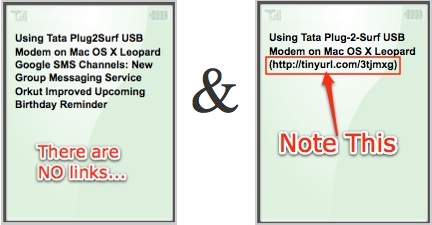
Now when Google SMS channel will fetch such converted link, they will send short urls to articles in SMS updates.
Below is screenshot which highlights this difference:
How to use:
1. Getting a converted link
- You can either get converted link using web interface provided at Google SMS Channels with TinyUrl
- OR simply prefix http://gsmslinks.rtcamp.com/ to your feed URL.
Example: http://feeds.devilsworkshop.org/rb286 will become http://gsmslinks.rtcamp.com/http://feeds.devilsworkshop.org/rb286
2. Modifying Existing Channel
- Go to Google SMS Channels. Switch to Manage Channels section.

- Just edit RSS/Atom feed URL. If you are creating a new channel, enter converted feed link here otherwise replace old link with converted link. Please DO NOT forget to remove prefix http:// from links as it is added by Google by default.
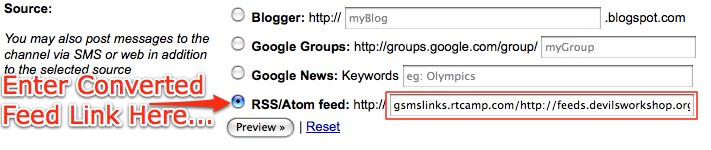
- Next better click on Preview button to check if desired results are coming in mobile emulator screen on page. If yes, click Update Channel button below.
If you have any question, please ask via comments only. If there exist option to do this, please let me know. 🙂
28 Comments
@ Rahul:
I am speechless! Thought I’ve not yet tested it but the idea is awesome.. Rahul always goes 1 step ahead of any other blogger..
@Deepak Jain
Thanks… 🙂
I guess then this is useful for some!
@Rahul Bansal –
Not just some… You see, everyone will use the same trick…
Just wait, I will stumble it and your server gets loaded now…
Thanks Rahul for writing such a Useful script.
U Really rocks dude 🙂
Gr8 work done.. bro…
To b very true … even I was working on it…
but finally..found this…
I”m very happy….
Cheersss to u….!!
Wil b waitg for ur useful postsss…lik this..
with regards,
thegrchet
@Chetan Palrecha –
Thanks for your encouraging comment buddy…. 🙂
Thanks for the lovely post.
I noticed today my Cricket-score SMS channel (CRICKETLIVESCOREBOARD) hit a new milestone and broke pass the 40,000 subscribers mark.
hey rahul this time a prob .i registered my no with google sms channel.but now forgot with which google account of mine i registered this one.so is there a way,so that i can manage my sms channel account,without sending sms from my mobile.
@nrj
Check your Google account one by one.
That’s the only way to figure it out as far as I know. 🙂
Hey all, I’ve worked around a way to receive Twitter updates in SMS using google sms channels. here I’ve posted how to do it
http://nivashspot.blogspot.com/2009/05/twitter-sms-updates-in-india.html
I used to get free sms from google channels daily on two of my mobile numbers viz 9205176577 and 9018657755 but suddenly they got stopped on a single day.I got a message on both like “rchd max limit” and frm that day no smss at all.Plz help at [email protected]
Recently i get to know about Google SMS channels and this channels will help a numerous users to get updates on their mobile indbox thanks to google for this wonderful initiative.
Can any one help me coz i have joined the sms groups of the groups provided by google. But i do not receive the msgs regularly. Has it been blocked or have i to join it again. But if i join it again a msg warns me that i am already the subscriber of that group???????
what to do……………plz suggest someone!!!!!!!!!!!!!!!!!!!!!!!!!!!!!!!!!
@Pranjal
Do check out if you have permitted Google to send SMS round the clock (find this on your SMS channel’s settings page)
Another way is using twitter. Go to twitterfeed. Then sign up. Then when you get the content posted on twitter, get your rss link from twitter & then add it to google sms channels.
@ Akshay
Yes, we are aware of it and that’s a good trick too! But its not always possible to use the twitter feed as many people even keep interacting with their followers on their twitter ID. So those messages will end up being delivered on each subscribers mobile.
@Deepak Jain
Ya i know that, but i made a separate account for this…
Hi Rahul,
This is no longer working as the access to gsmlinks.rtcamp.com is forbidden. Can you please let me know how do I convert my feed?
Regards,
Mohit
How do I make a channel from an RSS feed of my tweets?
Hi,
I’m Koyal and finds Google SMS Channel to be a great way of communicating for free. I used to sms on another great site called Noumoris, http://www.noumoris.com . I can SMS my relatives to all over the world and everything is free and SMSs are without any delay, I simply love the site.
Well hope Google offers the best since I am always glued to gmail.
thank you. Koyal from Mumbai
hi,
how i know subscriber of my channel…
Hai Rahul,
I created sms channel with name INDIANPROMOTOR. But i am not getting the web link to this channel even though i follwed your post. Plz help by providing the WEB LINK to this channel…
The bellow error showing…
This page contains the following errors:
—————————————————————————–
error on line 2 at column 1: Document is empty
Below is a rendering of the page up to the first error.
————————————————————————–
Plz help me.
Dear Rahul,
Great article! Your article keeps the hope alive for all those who believe that you can find out a solution to any sort technical problem that you encounter on the net,
is there any Title size limit that prevents the added link to appear in the SMS? Also is Google supporting this product now or is it an orphan product with no active development going on?
Thanks again.
Sanjay
@Sanjay
Google has almost discontinued this product I guess.
Last time, I checked it, it was broken on their end.
Thx for your revert. Any alternatives that you can think of ?