By default, file sharing over Bluetooth connection is disabled in Mac OS X Leopard. Even though scanning process from cellphone shows Mac in the list, when you try to send file to Mac, you get error like “file can not be sent”.
So to enable file sending follow this…
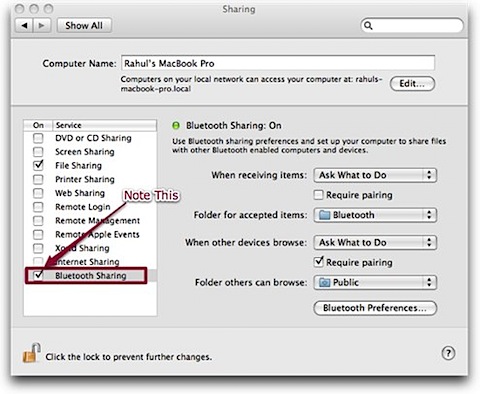
- Go to System Preferences >> Internet & Network >> Sharing. (see screenshot)
- Just tick Bluetooth Sharing option. Note that, although you are getting file sharing related error, file sharing option have nothing to do with it.
Thats it! Do not waste your time on mobile forums. I already did! 😉
26 Comments
I’ve been searching for a solution for this, too. Thanks for your post, which has specific instructions. 🙂
@Ederic
Your welcome buddy… 🙂
THANK YOU VERY, VERY, VERY MUCH.
@Nathali
Your welcome buddy… 🙂
thanks a lot…i was so frustrated abt it and now everything is fixed!!!!!!
=)
@LobsK
Welcome buddy… 🙂
Welcome To Devils Workshop! 😉
hey guys, do you know how can i webcam using mac msn?
million thx
@LobsK –
Which messenger you are using for MSN. It may not work form Adium so you need to use MSN messenger from Microsoft.
you can download a version call amsn to use webcam on Mac! good luck
Thanks a lot.. I was not able to figure our this, and searched for this content..
@Sridatta –
Your welcome buddy…. 🙂
Welcome To Devils Workshop… 😉
That just saved me a heap of time and from buying an expensive and confusing piece of software
Thankyou so much!!!!!!!!!!!!!!!!!!!!!!!!!!!!!!! been scrathing my head for days on this one….
Thanks sooo much! Spent all morning trying to figure out why I could send files to my phone but not receive them from the phone… now all is well!!! Cheers!
Excellent! Thank you.
Thanks – very helpful!
Ok, I love you. Just spent 2 hours trying to figure this out, downloading applications that didn’t work, reading through forums that say it’s not possible, looking for cables, messing with the SD card…. and all it took was clicking one little box. You are my hero.
Hey , i tried this but still doese’nt work , any suggestions to any other alternatives . Just bought the new mac book pro 13″ and this problem is kind of freaking me out . Please do help me out .
It says activate file sharing when i try to transfer to another mac , but its already switched on !!
OHMYGOD… youre so right. I got so confused with all the forums and different anwers. At Last! someone with a clear and simple answer. I am a newbie in MAC and have been finding it difficult to adapt. Thank goodness for you.
Thank youuu veryy muchhhh 😀
I got a g4 power book, my sharing screen doesn’t have anything about bluetooth
for me it says check status of sending device plese help
I can see why this would be disabled by default. Someone who doesn’t have a reason to turn it on, or know what they’re doing with it, could be opening themselves up to a host of possible problems from malevolent types (possibly).
I just found this, too, just before finding this page. I had the same feeling when I found it – whoa, what’s this doing here, and why is it buried, and why isn’t it more obvious/discussed on forums? Much better than adding more and more software that won’t work anyway…
Good job for publishing this solution!
Dani
Thank you very much, right to the point, where all other blogs, just miss the check option bluetooth sharing. I was soo frustrated, now works just fine 🙂
GAH! i LOVE you!
Thanks! simple when you know how, thanks for saying how!