
Few weeks back we came up with Ignore All button script which let you ignore all facebook application invitations in one click.
But Kenshiro, Kiljaeden and few users wanted similar button for blocking all applications.
If you are not familiar with blocking application…
you can visit any applications facebook page to block that application from using your information. This amongst the other things prevent application to send further add request to you.
Some really evil applications forces their existing users to invite other users in order to access or unlock important features they provide. As an example many quiz application let user take quiz directly but forces user to invite friends before he can proceed to results. Thus increasing spam!
Now back to topic!
This script adds two buttons as shown in above screenshot on facebook requests page.
- Block ALL Only button: This blocks all application found on request page but does not ignore pending requests. So if you choose to confirm any of pending request, you can still proceed to add that application. Note that adding any blocked application will unblock them automatically.
- Block & Ignore ALL button: This blocks all application found on request page and ignores pending requests!
Installation:
- If you are in Firefox with GreaseMonkey extension installed you can click here to install Block All Facebook Application Invite Script.
OR
- Download firefox if you don’t have it!
- Install GreaseMonkey extension for firefox. (SKIP this if you have GreaseMonkey too!)
- Close all firefox windows and restart firefox.
- Install Block All Facebook Application Invite Script
Quick FAQ:
Q: I just want to Ignore ALL request without blocking applications?
Ans. Use Ignore All button script which adds only ignores the applications.
Q: OMG! I blocked an application I wanted to use. How to unblock it!
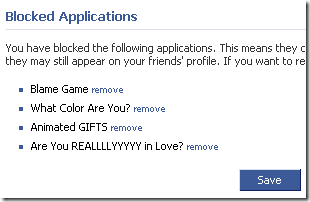
Ans: Go to this facebook privacy page and you will see blocked application list. Just click on remove links next to individual applications you want to unblock. Press Save to confirm changes. (see screenshot below)
Credits: Based on Ali Karbassis Auto-Block script & zetxs Auto-Ignore script!
Related Scripts: Ignore All button script
27 Comments
Awesome work guys. Good to see people using open sourced scripts to improve on them.
Keep up the good work.
@Ali
Its great to see your encouraging comment!
Thanks for ur code. It saved my lots of time. 🙂
awesome update and great tips ..
thanks
Thanks Rahul for these instructions. All working well…
@OPEN GIGA & Tuomas Parviainen
Thanks guys for encouraging comments! 🙂
You rock pal, keep up the great work! 🙂
@Jean
Thanks again for nice comment! 🙂
Guys, wondering if you could make a similar script for Opera? I work with Vista, and Firefox doesn’t work on Vista.
Thanks,
Moses
@Moses
You can use this solution on opera itself…
Act I did it long time back. But I will definitely write a separate post on it soon (mostly tomorrow)
@Moses
Article on using greasemonkey script from opera is here!
Bad news as this Block ALL script doesnt work on opera! BUT Ignore ALL script works without any problem! 🙂
Thank you Rahul! Much Obliged for the help.
@Moses
Ur welcome buddy… 🙂
Thank you!
A dream come true, you’ve given me 5 more minutes of free time everyday.
Posted it to everyone.
@toot
Ur welcome buddy… 🙂
Also thanks for posting it… 🙂
Hi there Rahul,
I cannot begin to emphasize enough, I really appreciate this addon, and it is an absolute please to post it on my site. Please do keep up the good work.
Also @ Moses, what version of vista do you use? Because I have 32 and 64 bit and they both use firefox. Just make sure you have to latest one.
@Alex
Sorry for late reply buddy…. 🙁
Thanks for your word of appreciation….
@Moses
Alex is right. Firefox works on windows vista. On 32-bit vista I had used it myself! 🙂
The script doesn’t work anymore. I tried to upgrade it, but I don’t have the skills.
@Michelangelo
Yes, this script is broken… 🙁
I figured out where its breaking so hope to fix this soon…
Thanks for notifying… 🙂
took me a minute to figure out you need to change the facebook.tld to an actual tld (ie .com/.jp/.ru) to get it to showing up on the reqs page. in case anyone else gets stumped on it… right click on the greasemonkey icon on the bottom right hand of firefox, go to manage user scripts and then edit the url string respectively.
doesn’t work on new facebook layout.