We all love Firefox for many reasons. One of them is its feature to store usernames and passwords. The best thing about this is, we can see saved usernames and passwords if we forgot them. Here is an excellent add-on which can allow you to export and import saved passwords. Such exported data comes handy when Firefox crashes or you want to set-up a new Firefox on another machine, e.g. laptop.
To see saved passwords go to Tools > Options > Security and hit the “Saved Password” button. Now click the “show password” option.
One may want to have backup of saved passwords. But, there is no such built-in option in Firefox. So you have to use an add-on like Password Exporter.
Password Exporter allows you to export your saved passwords in XML or CSV file formats. These exported files can be imported back to any firefox browsers running on any computer.
Once you install the Password Exporter, you can find options to Import/Export passwords in the security ta, as highlighted in below screenshot.
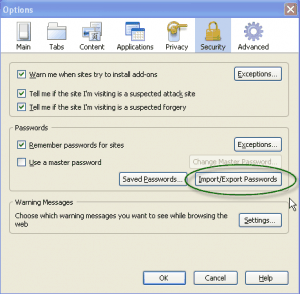
This Add-on is very useful if you use multiple computers, or multiple Firefox on same computers or even going to re-install the Firefox.
Please, keep the exported file as securely as possible. Mail it to yourself or encrypt it with a utility like Winrar.
Link: Password Exporter Firefox Addon
9 Comments
@ ArpitNext:
Good and informative post.. but I don’t think it would be of much use 🙁
@Deepak
Useful for me. I have more than 100 account created all over the web. So if Firefox crashes, I can’t just imagine recalling all login details. Firefox password storage is as important to me as my bookmarks. 🙂
@Deepak : thanks for your comment 🙂 .
@Rahul : Thanks for the corrections and adding stuffs !
@ArpitNext
My pleasure bro… 🙂
It is the very first add on I install on FF…
@ Arpit –
I wonder why you want to hide only few urls and display only bigadda.com 😉 ❓ 😀
@Pavan Kumar – I am using Roboform .. so I don’t want this addon 🙂
You blog entry definitely was one of the high points of my friday. I was on MSN searching for something totally unrelated when the blog caught my attention. I’m glad I took the time to read your post!